
The right file saves a week. Most delays on logo orders come from artwork: a screenshot instead of a vector, or colours picked from a screen. Here is what to send to SUKEAUTO.
Vector Files: AI, EPS, SVG or PDF
A vector logo is made of shapes, not pixels, so it scales to any print size without blurring and splits cleanly into colour layers for the printing plate. AI, EPS, SVG or a vector PDF all work.
When a High-Resolution PNG Is Enough
A PNG can work when the logo is a single colour, has clean edges, and is large — at least as wide in pixels as several times the print size. Photos, screenshots and renders with shadows or gradients don’t print cleanly on soft material.
No Vector Logo? Ask Your Designer for One
We don’t provide design services. Send your designer this request: “Please supply the logo as vector (AI/EPS/PDF), one-colour and full-colour versions, with Pantone references.” It usually takes them minutes.
Pantone Numbers, Not Screen Colours
Screens show colours differently, so we match ink and material to Pantone references. Colour matching on the squishy body is available as a paid service. Give the Pantone code for each colour in your logo.
The Proof You Approve Before Printing
Packaging artwork goes on the dieline we supply (cut lines, bleed and folds marked). We then produce a printed proof for your approval before production; check position, size and colour. Once approved, the proof is the production standard.
What Buyers Ask SUKEAUTO About Files
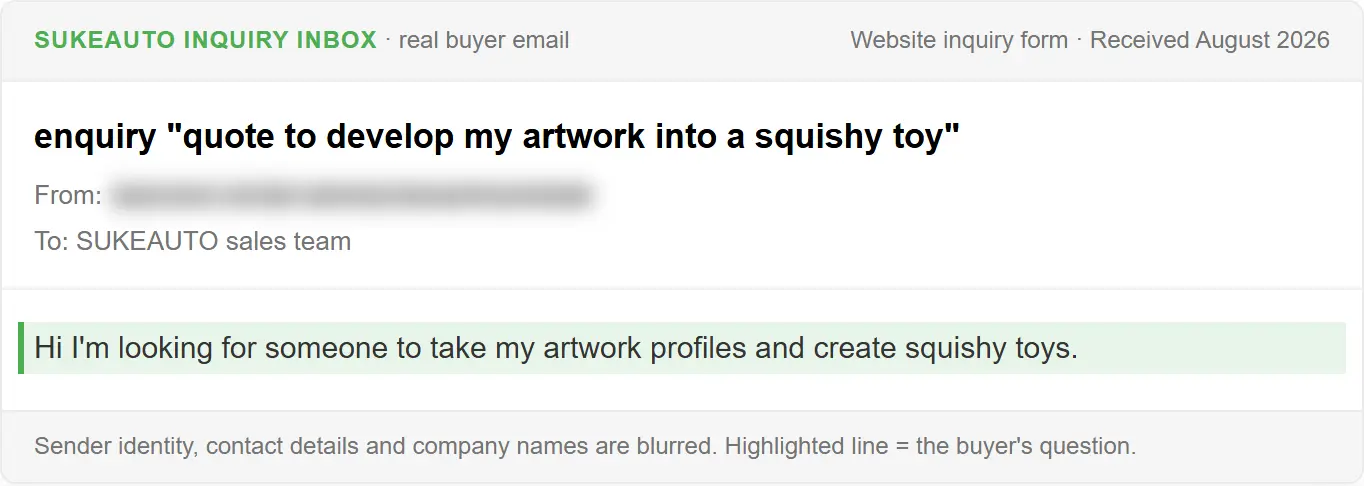
File questions usually come after the quote, when a buyer is ready to send artwork. 29 of the 408 squishy buyers who wrote to SUKEAUTO between July and October 2026 asked about files — which formats we need, whether a PNG will do, and whether we can work from artwork profiles or sketches. Getting the file right first time saves a full proof round.
A Print-Ready File Checklist
Print and packaging suppliers use broadly the same prepress rules. Before you send artwork:
- Format — AI, EPS, SVG or PDF (PDF/X-1a or PDF/X-4 for packaging); no Office documents, no low-resolution JPEGs.
- Fonts outlined — every piece of text converted to outlines so it cannot change on another computer.
- Spot colours named — each printed colour set as a Pantone spot colour, with its number.
- One layer per colour — each pad-print colour needs its own plate.
- Bleed for packaging — usually 3 mm on each edge of a box or card, with key text kept inside a safe margin.
- Dieline on its own layer — cut and fold lines as a separate, named layer, never merged into the artwork.
- Raster images at 300 ppi at print size — scaling an image up does not add detail.
- Small text in solid black — four-colour black on small text blurs if registration moves.
Why Squishy Printing Needs Simpler Artwork
A logo that looks crisp on paper may not survive on a soft, curved surface. Pad printing follows curves, but very thin strokes (under about 0.3 mm), tiny text and hairline outlines can break or blur. Gradients and photographic images are better reproduced by spray painting or on the packaging. When in doubt, send a simplified “small-use” version of your logo alongside the full one.
Colour Expectations
Pantone numbers come in different libraries: Coated and Uncoated for printing on paper, and separate plastics standards for coloured resin. A Coated chip will not look identical when matched in TPR, because the material’s own base colour, translucency and gloss change how the colour reads. SUKEAUTO matches as closely as the material allows and confirms the result on a physical sample, viewed under daylight-simulating light.
Common File Problems We See
- Logos pasted into a Word document or an email signature.
- PNG files with a soft or shadowed edge.
- Text that changes font because it was not outlined.
- Colours given as “brand blue” without a Pantone number.
- Packaging artwork without bleed, or with the barcode too close to a fold.
More File Questions
I only have a PNG — can SUKEAUTO still print my logo? SUKEAUTO prints from vector files; ask your designer for the master vector, which you will need for every future print job anyway.
Does SUKEAUTO send a proof before printing? Yes — SUKEAUTO sends a digital proof showing size and position on the actual item, then a physical sample for approval.
Which file do you need for a box? The dieline from us with your artwork placed on it, as a PDF with bleed and named spot colours.
Can one file work for the squishy and the box? Use one master logo, but export separate files sized for each use.
What resolution should photos on the box be? At least 300 ppi at the printed size.
Can SUKEAUTO print metallic or fluorescent colours? Ask before planning around them; some effects suit packaging better than soft material.
Print Standards Printers Use
Printers in every industry check incoming artwork against a few common rules. Knowing them saves a round of corrections:
- Outline the text. Convert fonts to outlines, or embed them, so the file opens the same on any computer. A useful test: open your file on a computer without your fonts — if the layout holds and nothing is missing, it is ready.
- Keep the editable source. Save a dated, editable copy before outlining, so changes stay possible later.
- Bleed on packaging. Packaging needs bleed — artwork that runs past the cut line — usually about 3 mm (0.12 in) on each edge, and more on die-cut boxes. Note that 3 mm and 0.125 in are not exactly the same; follow the template you are given.
- Safe area. Keep logos and text a few millimetres inside the cut line.
- Minimum sizes. Very small text and hairlines disappear; most printers ask for at least about 6 pt text, larger for white text on a dark background.
- Separate special layers. Die lines, white ink, foil and spot UV each go on their own named layer.
- Bright colours shift. Neon greens and electric blues look duller when converted from screen RGB to print CMYK; use a Pantone reference where the colour matters.
Packaging Files vs Product Files
Packaging is printed on paper or film, where fine detail, gradients and photographs work. The squishy itself is printed on soft, curved material, where only bold, simple artwork stays sharp. The same logo often needs two versions: a full version for the pack and a simplified one for the product. Sending both at the start saves time.
What a PDF Proof Does — and Doesn’t — Approve
A PDF proof approves content and position: the right logo, the right text, in the right place. It cannot approve the final printed colour, because screens and printed material show colour differently. Colour is approved on a physical sample or against a physical reference such as a Pantone chip. That is why SUKEAUTO sends a digital proof first and a physical sample before production.
A Quick File Hand-Off Routine
When you send artwork, send it in one message with everything the factory needs: the vector logo, a PNG preview, the Pantone numbers, the print position marked on a photo of the product, and the size in centimetres. One complete hand-off is faster than a chain of partial files, and it gives SUKEAUTO everything needed for an accurate proof on the first try.
Packaging Files Have Their Own Rules
A logo file for the squishy and a print file for its box are prepared differently. For printed boxes, cards and bags, printers expect:
- CMYK plus named spot colours. Pictures in four-colour process, brand colours as named Pantone spot colours. An RGB file sent to a printer shifts colour when it is converted.
- Text converted to outlines. If the printer does not have your font, unconverted text can change or break.
- Bleed of about 3 mm (1/8 in) beyond every cut line, so no white edge appears if the cut moves slightly.
- A safe zone of about 5 mm (3/16 in) inside cut lines and folds for text and logos.
- Minimum sizes. Very small text, around 8 pt for normal text and a little larger for white text on a dark background, and lines thinner than about 0.2 mm (0.008 in) may not print cleanly.
- Foil and embossing on separate layers, clearly named, and kept clear of folds.
- The barcode as a vector, or simply the number, so it can be generated at the right size.
SUKEAUTO sends the dieline for your box; place your artwork on it without moving or deleting the cut and fold lines.
Working With a Dieline
A dieline file usually contains several layers: the cut line, the fold or crease lines, the bleed area, the glue flap and sometimes the window cut-out. A few habits save a proof round:
- Keep the dieline on its own layer, set to overprint or as a non-printing layer.
- Check which panel is the front when the box is folded. Flat dielines are easy to misread.
- Keep important text off the glue flap and away from the window edge.
- Check that the barcode and warnings sit on panels that stay flat when the box is closed.
Naming and Sending Files
- Name files with your item name, the part and a version, such as “dumpling-box-front-v2”.
- Send the original files, not screenshots or images pasted into documents.
- Send the fonts or outline them.
- When you make changes, send the complete new file rather than describing the change in an email.
How Many Proof Rounds to Expect
A well-prepared file usually needs one proof round for layout and one for colour on a printed sample. Each extra round adds days, mostly waiting for replies. Approve by email, list every change in one message, and confirm the final version number so the right file goes to print.
Key Terms
- CMYK — the four process inks used to print full-colour images.
- Spot colour — a premixed ink matched to a Pantone number.
- Bleed — artwork extended beyond the cut line.
- Safe zone — the margin inside cut and fold lines where key content stays.
- Outlined text — text converted to shapes so it no longer depends on a font.
Does SUKEAUTO provide the dieline? Yes. SUKEAUTO sends the dieline for your box or card so your designer works to the right size.
Can SUKEAUTO fix a small file problem? SUKEAUTO flags problems such as missing bleed or RGB colours and asks your designer to correct the original.
Do I need separate files for the squishy and the box? Yes. SUKEAUTO prints the logo on the squishy and the artwork on the box from separate files.
Sources: SUKEAUTO inquiry inbox — 408 squishy buyers by email and WhatsApp, July–October 2026 · Pantone: plastics standards explained · Lemon Printing: artwork, bleed and PDF file guide.
Where will the logo go? Compare printed vs moulded logos and branded packaging. Back to custom squishy toy manufacturer.
Send Your Inquiry
Tell us the style, quantity, logo or packaging you need and your target date — we reply with the right route and a price range.
Leave A Comment